Taskbar Hero Item Guide: When to Sell, Keep or Upgrade Gear
Taskbar Hero mixes 500+ items, rarity tiers, Steam Market support, runes, cubes, and idle farming. That makes every good drop a small decision: use it now, test it, keep it for a later build, sell it, or check the market first. This guide gives you a repeatable item routine for progression and farming.
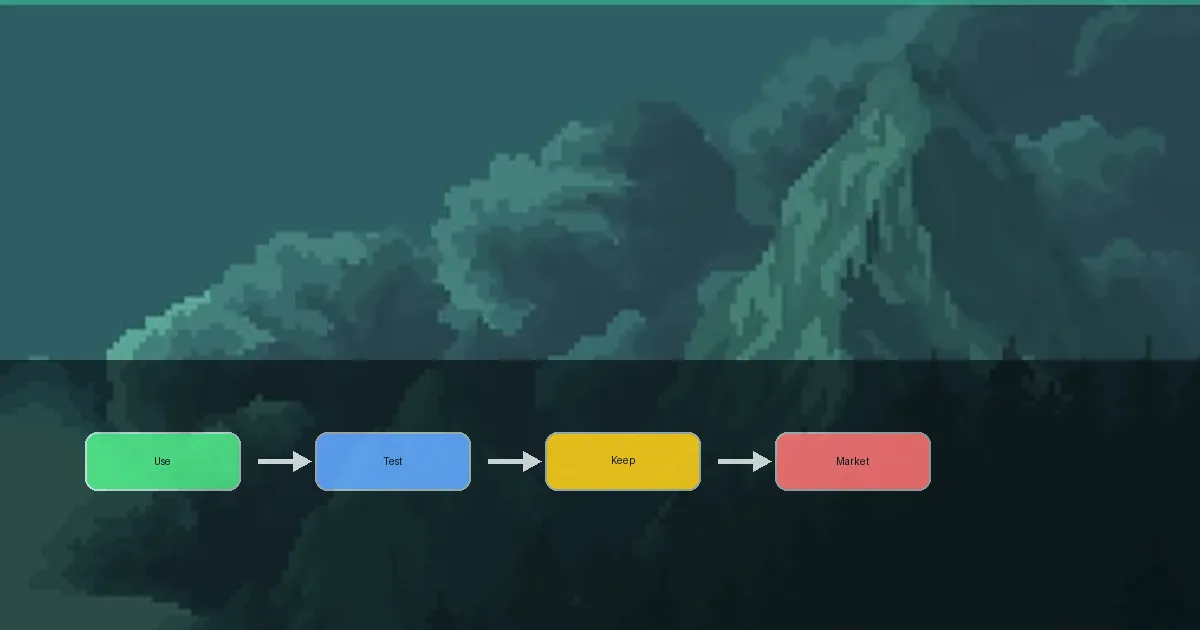
Split items into use now, test, sell, or verify
Do not judge equipment by rarity alone. A rare item can be wrong for your current build, while a lower rarity piece can still push an Act, stabilize your frontline, or improve farming speed. If an item may be tradable, check the in-game state and Steam Market before selling, dismantling, or spending upgrade materials.
- Decide whether the item supports damage, survival, farming speed, or material efficiency.
- Spend runes and cubes only after a short idle test proves the item helps.
- For tradable items, compare build value, storage value, and market price before acting.
Search terms and this page boundary
Close search terms need clear ownership. This page covers its main topic, adds useful supporting terms in copy and FAQ, and sends separate intent to the matching guide.
| Search term | Fit for this page | Action |
|---|---|---|
| taskbar hero market | High. This is the core Steam market and selling intent. | Use in flow, market cautions, and FAQ. |
| taskbar hero items / equipment | High. It directly supports sorting and upgrade decisions. | Use in tables and checklist. |
| taskbar hero runes | Related but not owned here. | Mention upgrade checks and link to the rune guide. |
| taskbar hero build | Adjacent role intent. | Point to the build guide. |
Similarweb keyword generator returned thin phrase-match and question tabs, while related keywords confirmed the parent term taskbar hero. The parent term is used naturally; distinct intents stay on their own pages.
A simple flow for every drop
Checking every stat line after a long idle session is slow. Use the same order every time: role first, progression impact second, upgrade value third, and market risk last.
| Step | What to check | Action |
|---|---|---|
| 1. Role fit | Does it help damage, survival, farming speed, or material efficiency? | Move off-role items to storage or sell candidates. |
| 2. Progress impact | Does it improve Act progress, boss speed, or idle stability? | Only visible upgrades deserve a short test. |
| 3. Upgrade value | Will you replace it soon, and is there a real reason to spend runes or cubes? | Upgrade only items likely to stay useful. |
| 4. Market check | Is it tradable, valuable, or risky to modify? | Choose use, store, or sell after checking the market. |
Market prices, tradability, and item behavior can change. Use the in-game item display, Steam Market, and official Steam page as the final sources.
Rarity starts the review, but it does not finish it
Taskbar Hero has a wide rarity range, but the best item is the one that solves the problem your build has right now.
Keep high rarity as candidates
Do not rush to sell a rare drop. Store it, compare its role, and decide after a test instead of upgrading immediately.
Use lower rarity when it fixes a problem
Early progression rewards practical upgrades. A modest item that adds needed damage or defense can be better than a rare piece with mismatched stats.
Test before committing
Run a short 10 to 20 minute idle test and look at stability, kill speed, and survival before spending materials.
Checklist before selling, keeping, or upgrading
Use this checklist when an item looks valuable but you are not sure what to do with it.
- Name the current problem: enemies live too long, the frontline dies, farming is slow, or inventory space is becoming messy.
- Match stats to roles: damage pieces want attack, speed, crit, or skill output; survival pieces want HP, defense, recovery, or damage reduction.
- Avoid heavy upgrades on items you expect to replace soon. Runes and cubes belong on gear that survives several tests.
- Check market candidates before selling or dismantling. Compare market price with the value the item has inside your own build.
- Before mass cleanup, confirm that you still have an alternative for each role so you do not remove your only survival item.
How to use the Steam Market safely
The official Steam page lists Steam Market support, but eligible items, pricing, and trade state can change. Treat the market as a check, not as a shortcut.
Do not sell only because the price looks good
If an item helps you push an Act or stabilize idle farming, its gameplay value may be higher than its sale value.
Check tradability before upgrading
An item state can matter. Review the in-game display before adding runes, cubes, or other changes to a valuable piece.
Expect prices to move
Steam Market prices fluctuate. Keep separate store and sell buckets so you can wait instead of making a rushed decision.
Inventory routine after an idle session
A repeatable cleanup routine prevents valuable drops from being mixed into junk.
| Bucket | Use | Warning |
|---|---|---|
| Equip or test | Gear that fits the current build or deserves a short test. | Move it back to storage if the test does not improve stability. |
| Store | High rarity, role-fit, or future-build items. | Too much storage makes comparisons harder. |
| Market check | Tradable or possibly valuable items that need price review. | Do not sell useful gear by price alone. |
| Sell or material | Duplicates, off-role gear, and items with no progression or market reason. | Recheck high rarity and unique effects before bulk actions. |
Common mistakes
- Spending runes or cubes on a high rarity item that does not fit the build.
- Dismantling a tradable item before checking the market.
- Selling an item that would solve the current Act problem because the price looks attractive.
- Changing gear without a short test and then losing long idle sessions.
- Keeping all drops in one pile until storage and sell candidates become impossible to separate.
Taskbar Hero Item FAQ
Should I keep every high rarity item?
Keep it long enough to compare, but rarity alone is not enough. If it does not fit a role and the market check is complete, it can become a sell or material candidate.
When should I upgrade gear?
Upgrade when the item clearly improves Act progress or idle stability and survives a short test. Avoid heavy investment in gear you expect to replace soon.
Should Steam Market items be sold?
Compare price, tradability, and build value first. The latest state should be checked in Steam Market and the game UI.
Do I need to clean inventory every session?
After long idle sessions, yes. Sorting into equip, store, market check, and sell buckets prevents mistakes.
What should beginners avoid selling?
Do not rush to sell items that solve your current failure point, items with no replacement, or high rarity items that have not been checked for tradability.
What should I check before using the taskbar hero market?
Check tradability, current build value, storage value, and sale price separately. Test useful gear briefly before selling it based on price alone.